
String References
In any program's code, you often encounter string data (registry keys, file names, error messages, etc.). It can be quite useful to see the list of strings used by procedures and functions in decompiled applications. That's exactly what our String references function is designed for, accessible through the Tools menu. To use it, simply navigate to Tools -> String references, and if your program contains any string data, they will be displayed as shown below:
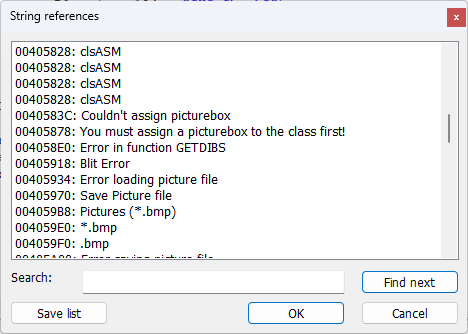
Find the desired line in the list and double-click on it. The code segment containing that line will be located, and the corresponding procedure will be opened in the code window. Double-clicking again on the line continues the search for this line within the program's code. Clicking 'OK' will find the highlighted line in the code and close the row selection dialog. Cancel simply closes the dialogue box.
The function to display String references is only available in the licensed version of the software and not accessible for Lite version.
Important note: strings are revealed not only for the active module as in versions 1.x program, but for the entire program. This change was made to facilitate analysis of programs with a large number of forms and modules.
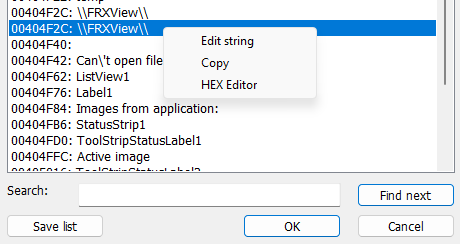
VB Decompiler also supports editing strings. To call the edit string dialog, right-click on the string you want to change and select Edit string from the context menu that appears. A dialogue box for entering a new string will appear. After changing the string, click Ok and the string will be directly modified in the edited file. We recommend creating a backup of the file being examined beforehand, bacause no backup is made during this action and canceling this operation is not possible.
Important note: when editing strings, remember that the length of the new string should not exceed the length of the old one. This is related to the format of binary application files where no space is reserved for inserting a longer string.
You can also view and partially edit the string in the HEX editor. To do this, right-click on the string and select HEX Editor from the menu that appears. In the HEX editor, there are functions for undoing and redoing changes, which simplifies experimentation when modifying string data of applications.
The window with a list of strings also has a text field called Search and a Find next button. This functionality will be useful for finding strings within the list, especially when dealing with large projects where manual visual search through the list is extremely difficult.